
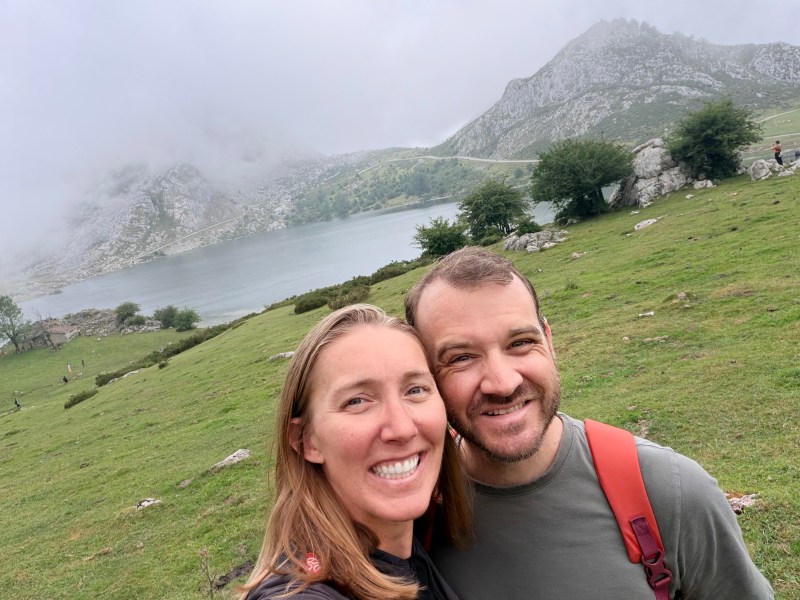
Rachel and I have just arrived back in Bilbao after a great trip to Asturias, our 16th autonomous community (out of 17) in Spain. Shortly before we left, I uploaded version 1.0 of AR Mobile Robotics as a macOS build to the App Store. Here I thought that, since ARMOR was already live as an iOS app, getting approval for a full release on Mac would be a trivial matter. I was wrong; the submission and approval process turned into about a month long struggle, complete with filling in questionnaires, submitting video, and re-uploading builds to fix unexpected UI inconsistencies. Finally, yesterday, the first published macOS build of AR Mobile Robotics is live, fulfilling my promise to make ARMOR provide a seamless transition between mobile and desktop robotics workflow. Keep reading the release notes below to learn a bit more about the latest update, and in the meantime, enjoy this photo of Rachel and I hanging out with the resident cows atop the Picos Europeo.
ARMOR started life on the iPhone. The idea was that the device most roboticists already carry — the one that fits in your pocket and points a camera at the world — should also be able to load a URDF, run MuJoCo physics, and export a simulation-ready MJCF. That idea turned out to work well enough that the question stopped being can this run on a phone and started being why isn’t this on the Mac too?
Check out more posts about ARMOR
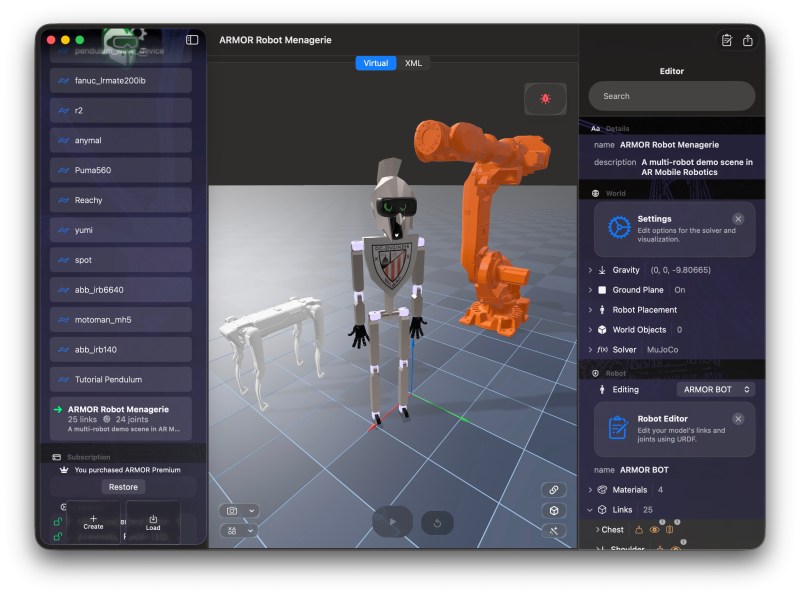
Today ARMOR is on the Mac App Store — same MuJoCo 3.9 engine, same URDF editor, same multi-robot world builder, now in a native macOS app. Projects you build on your Mac open on your iPhone. Robots you assemble on your iPhone export from your Mac. The pipeline you run on a desktop MuJoCo workstation now has a native Apple counterpart at every screen size.


The same physics engine, on every Apple screen
ARMOR on Mac runs the same embedded MuJoCo 3.9 engine introduced in v1.0. The headless build carries the OBJ, and STL mesh decoders and the mjs_attach scene-composition pipeline, compiled natively for Apple Silicon. The MJCF you export from the Mac is bit-for-bit identical to the one you export from your iPhone, and both run the same way in desktop MuJoCo on your workstation.
There is no cloud, no bridge, and no separate simulation backend. The solver runs on-device, whether that device is in your hand or on your desk.
A native Mac layout — sidebar, viewport, inspector
ARMOR on Mac adopts the three-column NavigationSplitView that macOS users expect from professional tools:
- Sidebar — your project library, with import, create, and share controls. Projects are grouped, searchable, and persist their last-selected state across launches.
- 3D viewport — the center column fills with the RealityKit-powered robot viewer. The same orbit, pan, dolly, and field-of-view controls that iOS users already know are here, driven by trackpad gestures.
- Inspector panel — a right-side editor, toggled with the toolbar button, that shows the project editor in-place without navigating away from the 3D view. The inspector has its own title bar and integrated search field, so finding a joint buried six levels deep in a complex robot doesn’t require leaving the viewport.
Orbit, pan, dolly on the trackpad
On macOS, ARMOR’s 3D viewport is powered by the same RealityKit renderer used on iPhone and iPad. The virtual camera respects the full trackpad gesture vocabulary:
- Two-finger drag — orbit around the robot
- Two-finger pinch — adjust field of view
- Secondary gestures — pan and dolly modes available from the camera controls overlay
The scene graph is identical to iOS: a Z-up coordinate frame that matches the URDF convention, a coordinate grid that moves with the model, and orbit-target crosshairs that scale with camera distance. What you see on the Mac is what you see on your iPhone.
Full XML visibility in URDF, SRDF, and MJCF
The XML tab on macOS now shows all the source documents in a multi-robot project, not just the first robot. A **source picker** at the top of the panel lets you browse:
- Per-robot — the URDF and SRDF (semantic description) for each robot in the project, with syntax highlighting
- World — the SDF-subset world XML that describes robot placements, physics settings, and static obstacles
- MJCF (Premium) — the compiled MuJoCo scene or a per-robot model, built from the same export pipeline your robot description will actually run through. Switching between sources is instant; all models compile in a single pass and are cached so re-entering the XML tab is free.
This makes the XML tab a useful audit tool: you can verify the world XML reflects your placement editor changes, and confirm the compiled MJCF matches what MuJoCo will load before you export.

Projects travel between devices
An ARMOR project saved on Mac opens on iPhone. A robot assembled on iPhone exports its URDF package from the Mac. The file format — `.armorproject` — is the same on every platform, and the share sheet on macOS connects directly to AirDrop, iCloud Drive, Messages, and Mail, so moving a project between devices is a single action.
For teams or workflows that pass robots between multiple people, the URDF package export (Premium) produces the same .zip on Mac as on iPhone: mesh files converted to your chosen format, a ready-to-load MJCF, a Gazebo .world, and a Drake .dmd.yaml, all in one archive.

Multi-robot worlds and semantic group states
Everything in the v1.0 multi-robot feature set is present on Mac. A project can hold multiple robots, each with its own pose, fixed or free base, and SRDF semantic description. The semantic group states (named joint configurations like “home” or “extended”) are fully supported in multi-robot projects: each robot carries its own semantic, activating a group state positions all robots simultaneously, and hitting reset restores every robot to its semantic position rather than the unposed default.
The physics scene composes all robots through the same mjs_attach pipeline on Mac as on iPhone, with joint names namespaced per instance so a six-DOF arm and a mobile base can coexist in a single model without name collisions.
Quality of life on macOS
A few details that matter when you’re spending a full workday in an app rather than reaching for it between tasks:
- Paywall in its own window — the subscription prompt appears as a native macOS window rather than a sheet, so it doesn’t block the document you’re working in.
- Inspector search — the search field in the inspector panel is constrained to the panel itself. It filters across links, joints, and world objects without taking over the main toolbar.
- Share sheet properly sized — the share sheet opens at a width and height that shows all export options without requiring a resize.
- Last project remembered — the project you had open when you quit is re-selected on launch. On a large project library, this saves the scroll-and-click on every startup.
- Examples in the library — the bundled example robots (armorBot, double pendulum, bouncing ball) appear in the sidebar on Mac and persist edits, the same way they do on iOS.
For the roboticist who works across the Apple stack
The practical argument for ARMOR on Mac is the same as it was on iPhone, just at a different point in the workflow. A field roboticist might inspect a URDF on their phone while standing next to the hardware. A simulation engineer might assemble a multi-robot world on their Mac and verify the physics before pushing to a CI pipeline. A student might prototype on an iPad and share the .armorproject with a lab partner who reviews it on their MacBook.
These are the same project file, the same physics engine, and the same XML — just at different screen sizes.
ARMOR for Mac is available now on the Mac App Store. If you’re already using ARMOR on iOS, your .armorproject files open immediately on Mac. If you have purchased ARMOR Premium, these will be visible immediately via iCloud synch. If this is your first time, the built-in examples are a good place to start — drop in the double pendulum, hit Play, and see what MuJoCo 3.9 does with it on Apple Silicon.