
As-promised (or threatened?), I officially released AR Mobile Robotics, the iPhone-native engineering and physics simulation app, on June 17, my 41st birthday. The latest builds have been focused on this idea that you should be able to view, edit, and export the same robot description files on your iPhone as on your desktop workstation. Now, this includes building a multi-robot scene, with objects that your robot can interact with. The idea of multiple robots in a single world is enabled by recent updates to MuJoCo that improve on model instancing, which I have also updated to MuJoCo v3.9 in ARMOR.



Releasing an app always brings me a lot of pride, but I still haven’t gotten the hang of marketing, social media, and everything surrounding. Perhaps a few of you netizens will haz cliq on seeing the awesome photos below from Zumaia. I’m not sure that will drive downloads to ARMOR, but at least you can see, it was my birthday this week, and life is good.


Many Robots, One World — ARMOR Reaches v1.0
ARMOR v1.0 is here, and with it, a project in ARMOR is no longer a single robot, it is a full multi-robot scene you can compose, simulate, and export from the device in your hand. Drop a manipulator and a mobile base into the same world, weld one to the floor and let the other fall under gravity, surround them with textured obstacles, press Play and then export the whole scene to a single MuJoCo MJCF that runs identically on your desktop.
This is the release where ARMOR stops being a viewer and becomes a genuine mobile robotics workstation.
Multiple robots in a single world
The marquee feature of v1.0 is multi-robot worlds. A project can now hold more than one robot, each placed at its own pose and each with its own fixed or free base. There are three ways to add a robot to your scene:
- Duplicate an existing robot already in the project — the copy inherits the original’s fixed/free behavior and is auto-offset so it doesn’t spawn on top of its twin.
- Import a robot from another project in your library — pull an arm you built last week into today’s scene.
- Load a new URDF through the same importer you already use for single robots.
You can fine-tune each one’s pose and base type in the robot placement editor. Every robot in the world is rendered live in the 3D view and simulated together in one shared physics scene.

Multi-robot scenes are a premium feature — free projects support a single robot, and ARMOR Premium unlocks placing as many as your scene needs. (New this release: a redeem button for promo and review codes.)
A new engine under the hood: MuJoCo 3.9
Composing several robots into one valid physics model is not a cosmetic change — it required upgrading ARMOR’s embedded solver to MuJoCo 3.9 (built from our open swift-mujoco fork). MuJoCo 3.x introduced the MjSpec model-editing API and mjs_attach, which let ARMOR compile each robot independently and then attach them into a single composed scene with proper name-spacing — no fragile string-splicing of XML, and no risk of one robot’s joints colliding with another’s.
The composition is careful about the rules MuJoCo enforces: a free-floating base needs its free joint at the top level of the world body, so ARMOR welds each robot in first and then injects the free joint where MuJoCo expects it. The result is a single model that respects every robot’s intended base type. The headless build keeps the OBJ, STL, and MSH mesh decoders you need while dropping the desktop renderer, so it stays lean enough to run on a phone.
The practical upshot: the same engine generation that powers desktop MuJoCo today is the one running in your pocket.
Dress your scene — textures and mesh obstacles
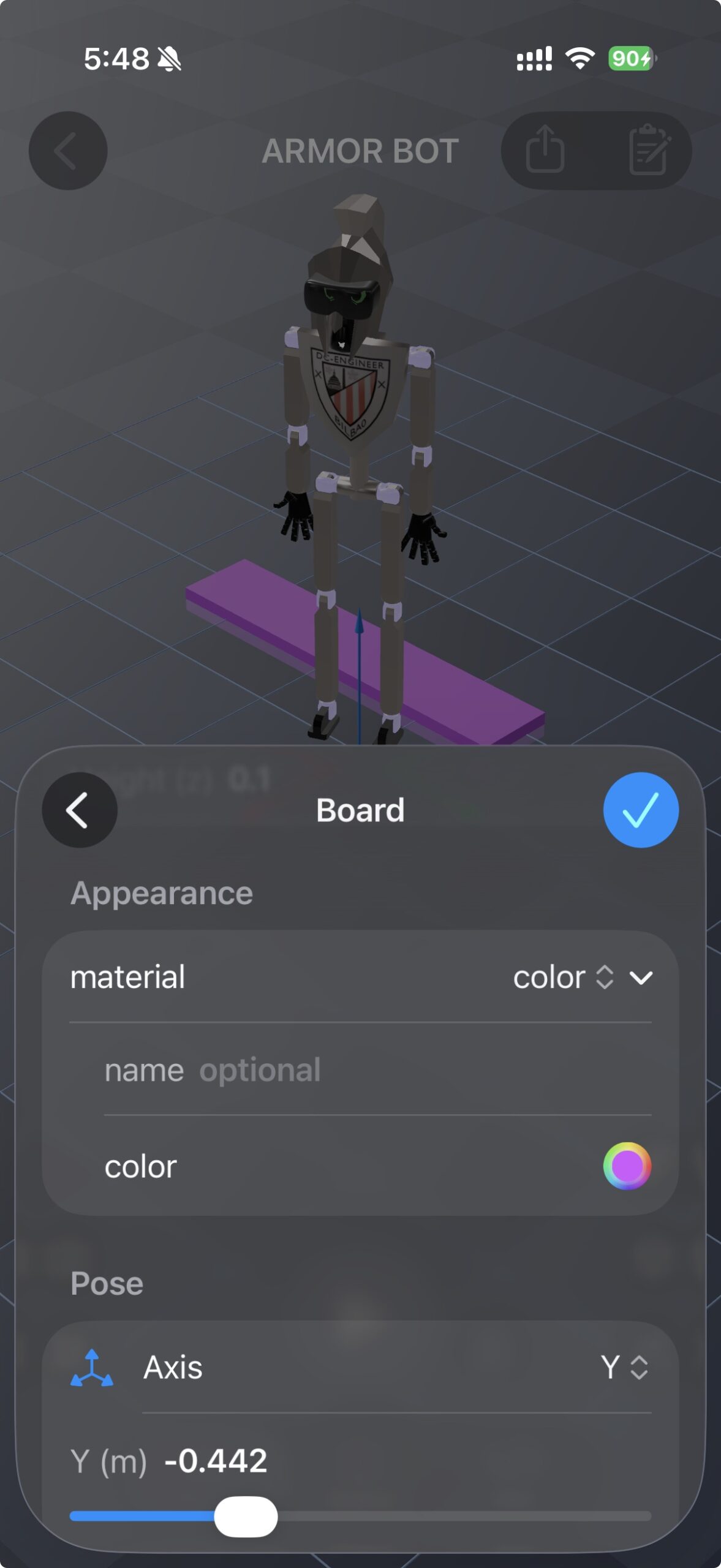
World objects grew up in v1.0. Beyond the box, sphere, and cylinder primitives from v0.12, you can now give world objects a real appearance and bring in arbitrary mesh geometry:
- Color or texture — pick a solid color or apply a texture image, exactly the winsay you already style a robot’s links. Textures travel with the export.
- Mesh objects — add a
.usdz,.obj, or.stlmesh as a world object, either by importing a new file or selecting one already in the project. Mesh obstacles get a full convex-hull collision so your robot can actually interact with them, not just see them.
Static or dynamic, primitive or mesh, every object is both rendered in the 3D view and compiled into the simulation.
Export the whole world — what you simulate is what you export
In v0.12 we made the single-robot simulation and its MJCF export share one source of truth. In v1.0 that guarantee extends to the entire multi-robot scene. Export a world with two robots — say a welded arm and a free-floating quadruped — and you get a single MJCF that opens on a desktop MuJoCo workstation with both robots in their correct poses, the welded one bolted down and the free one settling under gravity, surrounded by your obstacles and standing on your ground plane.
A few things we polished to make the exported scene look right out of the box:
- Scene lighting — exports now ship with a directional light, so a scene that looked fine in ARMOR isn’t pitch-dark when you open it in `simulate` on the desktop.
- A reflective floor — the ground plane now exports with a glossy, slightly reflective material, the look you see in most MuJoCo demo videos.
- Shared materials across instances — duplicated robots now share their material definitions in the exported MJCF instead of one copy rendering dark. Identical robots look identical.


Quality-of-life: named projects, remembered cameras, faster loads
v1.0 also brings a round of polish to how projects feel day to day, backed by a new persistence schema:
- Name your projects. Projects now carry an editable name of their own, shown in the sidebar and used throughout the app, with a rename control in the project editor. No more guessing which “untitled” is which.
- The camera remembers where you left it. Your orbit position, distance, and field of view are saved per project, so reopening a scene puts you back at the angle you were working from.
- Faster, smoother loads. When you select a project in the sidebar, ARMOR now warms its 3D assets in the background — a small progress indicator shows while meshes decode, navigation stays responsive, and the assets stay warm if you step back to the sidebar and return, so big models snap into view instead of reloading.
A 1.0 worth the number
ARMOR has always been about doing real robotics work from a device in your hand. v1.0 is the release where that promise comes together: compose a scene with as many robots as you need, trust the MuJoCo 3.9 physics to behave the way it will on your workstation, and export the whole thing — robots, obstacles, floor, and lighting — in one shot.
Try it Out
ARMOR v1.0 is available now, join the TestFlight beta or Download on the App Store. I’d love to see the worlds you build — how many robots you’re putting in one scene, what you’re having them do, and which desktop tools you’re exporting to. Let me know how it fits into your pipeline.