
When I worked at APL, I supervised “The Dynamics Section,” a unique grouping of eight researchers with advanced engineering degrees (mostly pHDs) and targeted interest in first-principles dynamics analysis. In my last year on the job, my office-mate and I went down the rabbit-hole of checking out a whole reel of videos that folks had posted to YouTube featuring double pendulums in various forms; a perfectly valid workday exercise for a couple of dynamicists. My coworker then took it on himself to build one himself, which we would subsequently hang on our door, making highly effective use of the prototyping equipment of one of the on-site prototyping labs.
Its subsequently become somewhat of a personal tradition of mine that anytime I come across some new physics simulation (Simscape, MuJoCo, Drake, Python) or 3D rendering (Unity, Blender, RealityKit) software, the first model I build is this same double pendulum. As I’ll discuss in the article to follow, I always like to render the pendulum with a door behind it, as a nod to the door at my old office.
What Is TwoLinks?
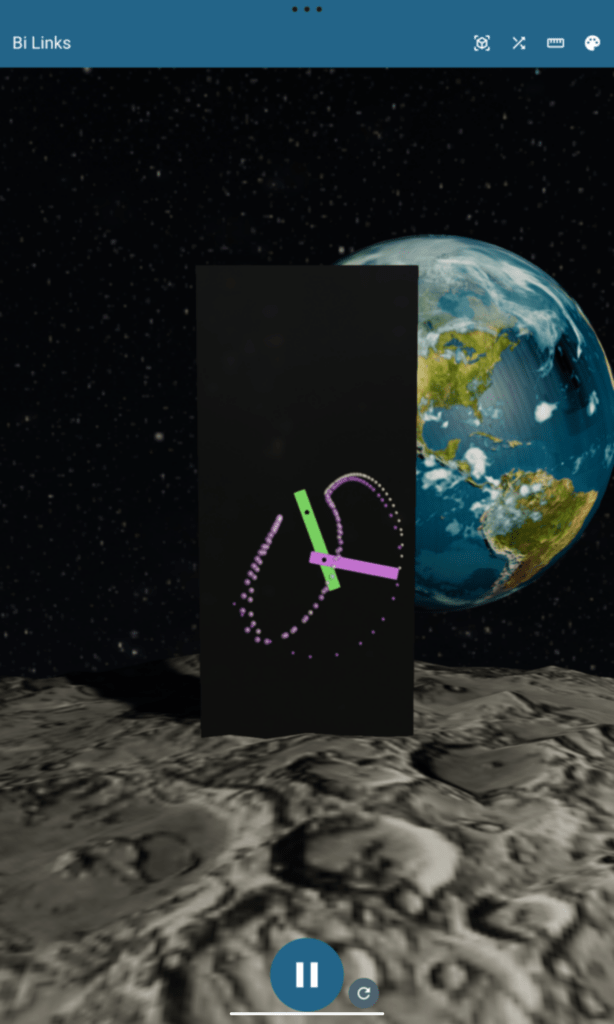
TwoLinks is a real-time 3D physics simulation of a chaotic double pendulum swinging freely under gravity. The setup sounds simple, and yet the resulting motion is completely unpredictable. Shift the length of one link by a centimeter, or move the pivot point a few millimeters, and the long-term trajectory diverges entirely from what it was before. That extreme sensitivity to initial conditions is the hallmark of chaos theory, and the double pendulum is one of its most famous physical demonstrations.
The app renders this in real-time 3D with a shiny black monolith, the “door,” two rectangular links hanging from cylindrical pivots, orbiting planets in the background, and a particle trail streaming from the tip of the second link. You can tune the length, hinge offset, center of mass, and color of each link, and on Android or iOS you can place the whole mechanism into your real physical environment using Augmented Reality (AR) via ARCore and RealityKit. It is free on iOS, Android, and directly in a web browser.


The underlying physics are derived from Lagrangian mechanics with Kane’s method, in a Python notebook. The equations of motion are expressed in generalized coordinates and numerically integrated each frame using a fourth-order Runge-Kutta solver. This is a well-established approach to multi-body dynamics simulation, used widely in robotics and mechanical engineering.
The engineering challenge I want to write about here is not the math. It is the rendering: specifically, how I got a single codebase to produce native 3D graphics across Android, iOS, and a web browser, and what I learned about Kotlin Compose Multiplatform and the SceneView library in the process.
The Motivation: Finding a Practical Cross-Platform 3D Renderer
The first Kotlin Multiplatform app that I published was YouKon, a unit conversion and engineering measurement tool designed for technical professionals. YouKon handles everything from structural material properties to aerospace vehicle mass data, grouping related measurements into projects with automatic conversion between Imperial and SI unit systems. Getting YouKon onto both the App Store and Google Play from a single shared Kotlin codebase validated the KMP architecture for me and made me want to push further into what the platform could do.
TwoLinks was the next experiment: could Kotlin Multiplatform handle not just data and UI, but real-time physically-based 3D rendering?
The question matters beyond this specific app. I am also developing ARMOR, an Augmented Reality Mobile Robotics app for iOS, and have modernizing Mobile Multibody Dynamics on my laundry list of future tasks. The former, ARMOR, loads Universal Robot Description Format (URDF) robot models, runs high-fidelity MuJoCo physics simulations, and lets you place industrial robots like the ABB YuMi or Boston Dynamics Atlas into your real environment through RealityKit. ARMOR is a professional spatial engineering tool aimed at roboticists who need to visualize kinematics, collision geometry, and joint behavior in the real world, without being tethered to a desktop workstation. Both apps are by their nature, 3D, and would benefit from a multiplatform solution.
ARMOR is currently iOS-only. The natural next step is Android. And that is exactly where a cross-platform 3D renderer becomes critical: I do not want to maintain two entirely separate rendering codebases for what is fundamentally the same simulation. Having worked through TwoLinks, I now have a realistic picture of what a SceneView-based Android port of ARMOR would look like. More on that in the conclusion.
SceneView: From Google’s Abandoned SceneForm to a Community-Maintained Filament Wrapper
To understand why SceneView is the right choice to evaluate here, a brief history is useful.
In 2018, Google released SceneForm, an Android SDK that let developers place 3D models into AR scenes using ARCore. It was declarative, well-documented, and integrated cleanly with Android’s view hierarchy. The community adopted it widely, particularly for engineering and industrial AR applications where visualizing spatial data in context is invaluable. Then in 2021, Google quietly archived the repository. No replacement was announced. Developers with production AR apps built on SceneForm were left holding an unmaintained dependency.
Into that vacuum stepped the open-source community. SceneView emerged as a fork and evolution of SceneForm’s API concepts, rebuilt on top of Google’s Filament rendering engine. Filament is Google’s own physically-based rendering engine — it powers Android’s camera viewfinder, Stadia, and numerous production Google apps — and crucially, it is cross-platform. Filament runs natively on Android, iOS, macOS, Linux, and in the browser via WebAssembly. This is a different proposition from SceneForm, which was Android-only.
SceneView eventually grew a Kotlin Multiplatform branch covering three platforms:
- Android via Jetpack Compose and Filament’s native Android backend
- iOS via a Swift package (SceneViewSwift), wrapping Apple’s RealityKit
- Web via a JavaScript bridge to Filament’s WASM build, called through Kotlin/Wasm interop
For a developer looking for a single cross-platform 3D renderer they can use from Kotlin, this is one of the few realistic options available today. Let me explain what working with it actually looks like on each platform.
The Shared Kotlin Architecture
Before the platform-specific code, it is worth establishing what actually lives in the shared layer. This is where Compose Multiplatform delivers its real value — not in the 3D rendering, but in the application logic and UI around it.

The TwoLinks data class holds the complete physical state: two link angles, two angular rates, the link geometry, colors, and mass properties. MainViewModel owns a MutableStateFlow<TwoLinks> and exposes it read-only. Every frame, the platform-specific scene view calls viewModel.updateOnFrame(frameTimeNs), which computes the time delta since the previous frame and advances the Runge-Kutta integrator.
All of the Compose UI — the top bar, dimension and color editors, control buttons, is in commonMain and runs identically on every platform. The 3D rendering surface is behind a single expect declaration:
// commonMain
@Composable
expect fun TwoLinksSceneView(viewModel: MainViewModel)Each platform provides its own actual implementation. That boundary is where things get interesting.
Android: Declarative 3D Scene Graphs With Jetpack Compose
The Android implementation is my favorite of the three, and the reason is architectural: SceneView on Android expresses a 3D scene graph using nested Jetpack Compose composables.
SceneView provides composable functions (SceneView, Node, CubeNode, CylinderNode, ModelNode, LightNode ) that live inside SceneScope and NodeScope receivers. Children are nested lambda arguments. The visual structure of your code mirrors the transform hierarchy of your scene:
// Android actual implementation — node hierarchy mirrors scene graph
SceneView(
    engine = manager.engine,
    cameraNode = manager.cameraNode,
    autoCenterContent = false,
    onFrame = { frameTime -> viewModel.updateOnFrame(frameTime) }
) {
    LightNode(
        type = LightManager.Type.DIRECTIONAL,
        direction = normalize(-Planet.sun.position),
        apply = { intensity(100_000f); castShadows(true) }
    )
    DoorNode {
        PivotNode(position = pivot1Z)
        LinkNode(links[0], position = pivot1Z,
                 rotation = viewModel.linkOneRotation) {
            PivotNode(position = state.pivotPosition)
            LinkNode(links[1], position = state.pivotPosition,
                     rotation = viewModel.linkTwoRotation)
        }
    }
    PlanetNode(manager.moonInstance, planet = Planet.moon)
    PlanetNode(manager.earthInstance, planet = Planet.earth)
    ParticleEmitterNode(manager.particleEmitter)
}DoorNode, PivotNode, LinkNode, and PlanetNode are custom composable functions, specifically created for TwoLinks, wrapping SceneView’s primitives. The nesting tells the story: LinkNod for the first link accepts a lambda where the second pivot and second link live as children. When linkOneRotation changes, the entire subtree rotates automatically because Filament propagates transforms down through the entity hierarchy.
This is exactly the API design you would want for a 3D scene graph framework. The fact that it maps cleanly onto Compose is a genuine achievement, and it makes the Android code the most readable of the three implementations.

The rough edges are real but isolated. I’m mostly an iOS developer, so when I’m working on Android, its on a cheap Lenovo tablet that I bought five years ago, lacking the AR-optimized features available on flagship phones. In my case, I was getting very cryptic, native crashes referencing a mysterious spherical_rectifier.cc. The crash logs provided minimal assistance in debugging, but I eventually determined that I was enabling ARCore’s depth estimation with software-based Motion Stereo, even though on my device that feature does not exist. Distinguishing hardware depth sensors (ToF, LiDAR) from software emulation using CameraConfigFilter with REQUIRE_AND_USE before enabling depth mode is the fix, but it required hours of debugging to isolate. There were also lifecycle ordering issues with the particle emitter after switching between Standard and AR modes: Filament material instances were being destroyed while their renderables were still attached to the scene. The fix required careful use of DisposableEffect to guarantee that initialize() always runs after any prior dispose() from departing composables — a subtlety in Compose’s effects phase ordering that is non-obvious until you hit it.
iOS: A Composable Shell Around RealityKit
On Apple platforms, the Compose layer wraps a native Swift view controller using UIKitViewController. Control passes immediately into Swift, which is also provided with a reference to the shared Kotlin view model:
// appleMain — Kotlin side of the iOS bridge
actual fun TwoLinksSceneView(viewModel: MainViewModel) {
    val factory = sceneViewFactory ?: return
    UIKitViewController(
        factory = { factory(viewModel) },
        update = { },
        modifier = Modifier.fillMaxSize()
    )
}The sceneViewFactory is a lambda registered from Swift at app startup. From there, SceneViewSwift provides a SceneView wrapper around RealityKit:
SceneView { root in
    manager.buildScene(root: root, representing: viewModel)
}
.cameraControls(.orbit)
.autoCenterContent(false)
.environment(.custom(name: "NightSky", hdrFile: "NightSky"))
.mainLight(.custom(sunLight))The buildScene closure is where the scene graph is constructed, and here the contrast with Android becomes clear. Instead of nested composable lambdas, you build the hierarchy by explicitly calling addChild() on RealityKit entities:
// Swift — SceneManager.buildScene()
// Parent-child relationships set explicitly via addChild()
let wrapper = Entity()
root.addChild(wrapper)

let pivot1Anchor = Entity()
wrapper.addChild(pivot1Anchor)

let link1Anchor = Entity()
pivot1Anchor.addChild(link1Anchor)
link1AnchorEntity = link1Anchor

let link1 = ModelEntity(mesh: link1Mesh, materials: [...])
link1Anchor.addChild(link1)
link1Entity = link1

let pivot2Anchor = Entity()
link1Anchor.addChild(pivot2Anchor)
pivot2AnchorEntity = pivot2Anchor

let link2Anchor = Entity()
pivot2Anchor.addChild(link2Anchor)
link2AnchorEntity = link2Anchor

let link2 = ModelEntity(mesh: link2Mesh, materials: [...])
link2Anchor.addChild(link2)
link2Entity = link2This is procedural, imperative scene construction, the same pattern any RealityKit developer would write. The hierarchy is real and correct; rotating link1Anchor still carries everything beneath it. But you are assembling it manually rather than describing it structurally. The declarative feel of the Android implementation does not carry over.
Developers building iOS AR apps using RealityKit directly would write exactly this same code. The practical consequence for a multiplatform project is that the 3D scene code lives in Swift, not in shared Kotlin. The Compose layer handles the UI controls, and those are genuinely shared. But the rendering scene graph itself is platform-specific Swift.

For my future work on ARMOR, the spatial robotics engineering app with MuJoCo simulation, this is the key insight. An Android port of ARMOR using SceneView would share the Compose UI, the URDF data model, and the simulation state. The RealityKit scene construction code would need to be re-expressed as Filament/SceneView nodes on Android. That is non-trivial work, but it is bounded work: the scene graph structure is clear, and the Android Compose node API would let me express it more cleanly than the Swift original.
Web: Filament via WebAssembly and JavaScript Callbacks
On the web, Filament runs as a WebAssembly module. This is the same Filament engine that runs natively on Android. Open the web app and the Android app side by side, and they look nearly identical.
Getting there requires a JavaScript bridge. Kotlin/Wasm cannot call Filament’s WASM API directly, a JavaScript intermediary is needed. That layer exports functions like initSceneViewAsync, createBox, createCylinder, and setEntityTransform. On the Kotlin side, each is declared as an `external` function:
@JsFun("initSceneViewAsync")
external fun initSceneViewAsync(canvas: HTMLCanvasElement, onReady: (JsAny) -> Unit)

@JsFun("createBox")
external fun createBox(sv: JsAny, sx: Float, sy: Float, sz: Float,
                       r: Float, g: Float, b: Float): JsAny

// Transforms must be passed as 16 individual floats — no struct marshaling across the WASM boundary
@JsFun("setEntityTransform")
external fun setEntityTransformJs(sv: JsAny, entity: JsAny,
    m00: Float, m01: Float, m02: Float, m03: Float,
    m10: Float, m11: Float, m12: Float, m13: Float,
    m20: Float, m21: Float, m22: Float, m23: Float,
m30: Float, m31: Float, m32: Float, m33: Float)Scene construction runs inside a callback passed to initSceneViewAsync. Unlike the Android scene graph the web implementation manages a flat list of entity handles and recomputes and applies every world-space transform each frame:
sceneManager.initSceneViewAsync { svRef ->
    val doorEntity = createBox(svRef, door.width, door.height, door.thickness,
                               door.color.x, door.color.y, door.color.z)
    setEntityTransform(svRef, doorEntity, translation(Float3(0f, 0f, -0.5f * door.thickness)))

    // All entities created; refs captured in closure...
    fun renderLoop(timeMs: Double) {
        val timeNs = (timeMs * 1_000_000.0).toLong()
        viewModel.updateOnFrame(timeNs)

        // Recompute world-space transforms each frame (no scene graph propagation)
        val link1OriginT = translation(pivot1Z) * rotation(viewModel.linkOneRotation)
        setEntityTransform(svRef, link1Entity,
            link1OriginT * translation(state.links[0].center) * scale(state.links[0].size))

        val pivot2T = link1OriginT * translation(state.pivotPosition) * pivotRotation
        setEntityTransform(svRef, pivot2Entity, pivot2T)

        window.requestAnimationFrame(::renderLoop)
    }
    window.requestAnimationFrame(::renderLoop)
}The Compose layer punches a transparent hole through the Skiko canvas so the Filament WebGL canvas underneath shows through. Drag gestures on that transparent region orbit the camera. UI elements drawn above consume their own events first. It works, and it looks great.

But the practical weight of this setup deserves honest discussion. Kotlin/Wasm generates a large bundle, as it requires the Skiko runtime, the Kotlin standard library, the Filament WASM module, and the 3D assets. Browser users face a noticeable initialization delay before anything renders. For a production web app targeting general users, this is a significant barrier.
A developer who wants a 3D scientific visualization in the browser and is not already invested in the Kotlin/Android ecosystem would almost certainly be better served by Three.js or Filament’s own JavaScript API. The Compose Multiplatform layer adds cognitive overhead and bundle weight in exchange for sharing physics logic and UI code with mobile. Whether that trade-off makes sense depends entirely on how much you value the shared codebase — for TwoLinks, where the physics model, the view model, and all the UI controls are genuinely shared, I think it does.
Closing Thoughts on SceneView as a Cross-Platform 3D Renderer
SceneView is tackling something genuinely difficult: a unified API surface over three fundamentally different 3D rendering systems. My honest assessment, platform by platform:
Android is where SceneView is at its strongest. The Jetpack Compose integration is not just functional — it is architecturally elegant. Expressing a Filament scene graph as nested composables maps perfectly onto Compose’s mental model, and the resulting code is more readable than anything I could write using the raw Filament API. If you are building a real-time 3D scientific visualization app, an engineering simulation, or an AR experience on Android, SceneView is the most pleasant way to do it I have found. Device-specific crashes from software depth sensors are a real irritation but an edge case, not a fundamental flaw.
iOS looks polished, performs well, and the AR integration via RealityKit is excellent. But for a cross-platform developer, it is important to understand what SceneView actually is on iOS: a helpful Swift package on top of RealityKit, not a shared renderer. The scene construction code you write is RealityKit code. The Kotlin/Compose layer provides the UI shell and the shared application state, but the 3D scene itself lives in Swift. For an app like ARMOR, where the iOS rendering is already in RealityKit and the goal is to reach Android, SceneView gives a clear path forward: translate the Swift entity hierarchy into Compose node lambdas, and the Android implementation practically writes itself.
Web is good for what it is: a browser-accessible version of the same app with visually consistent output to Android. The Filament WASM backend is impressive, and the Kotlin/Wasm interop is workable. My reservations are about practicality for production web products at scale. Most web developers targeting 3D scientific or engineering visualization would be better served by native browser frameworks. The real value of the web target in a KMP project is reach and accessibility, not architectural elegance.
The DC-Engineer App Ecosystem
TwoLinks is part of a growing set of engineering and scientific mobile apps I am building under the DC-Engineer umbrella:
- ARMOR: Augmented Reality Mobile Robotics. Load URDF robot models, run high-fidelity MuJoCo physics simulations, and visualize robots like the ABB YuMi, Boston Dynamics Atlas, or the Hugging Face Reachy in your real physical environment using ARKit. Coming to iOS. *Android support is on the roadmap, and the lessons from TwoLinks and SceneView are directly informing how I will approach it.*
- Mobile Multibody Dynamics: The first multibody dynamics app on iOS and Android, and the flagship application for DCDC LLC. “MOMDYN” utilizes the Python-based
sympy.physics.mechanicspackage to provide symbolic equation of motion generation, and includes a custom solver to simulate motion. SceneKit and Filament are used for 3D rendering on separate iOS and Android builds, respectively. - YouKon: Unit conversion and engineering measurement management for technical professionals. Group related measurements into projects, convert between Imperial and SI, and manage material properties databases including density, elastic, and strength characteristics. Available now on iOS and Android. *YouKon was my first published Kotlin Multiplatform app and validated the KMP architecture that TwoLinks is built on.*
- TwoLinks: Real-time 3D double pendulum physics simulation with AR support on Android and iOS. The app you just read about. Free on iOS, Android, and web.
*Source code for TwoLinks is available on GitHub. Questions, feedback, and pull requests are welcome.*
Enjoy every single day